Split a song into stems in your browser
Load a song and it comes apart into drums, bass, vocals and a guitar / other part. Mute the one you play and jam over the rest, loop a hard bar, or sing over the backing. The audio is analysed on your device; nothing is uploaded.
Open the studio, free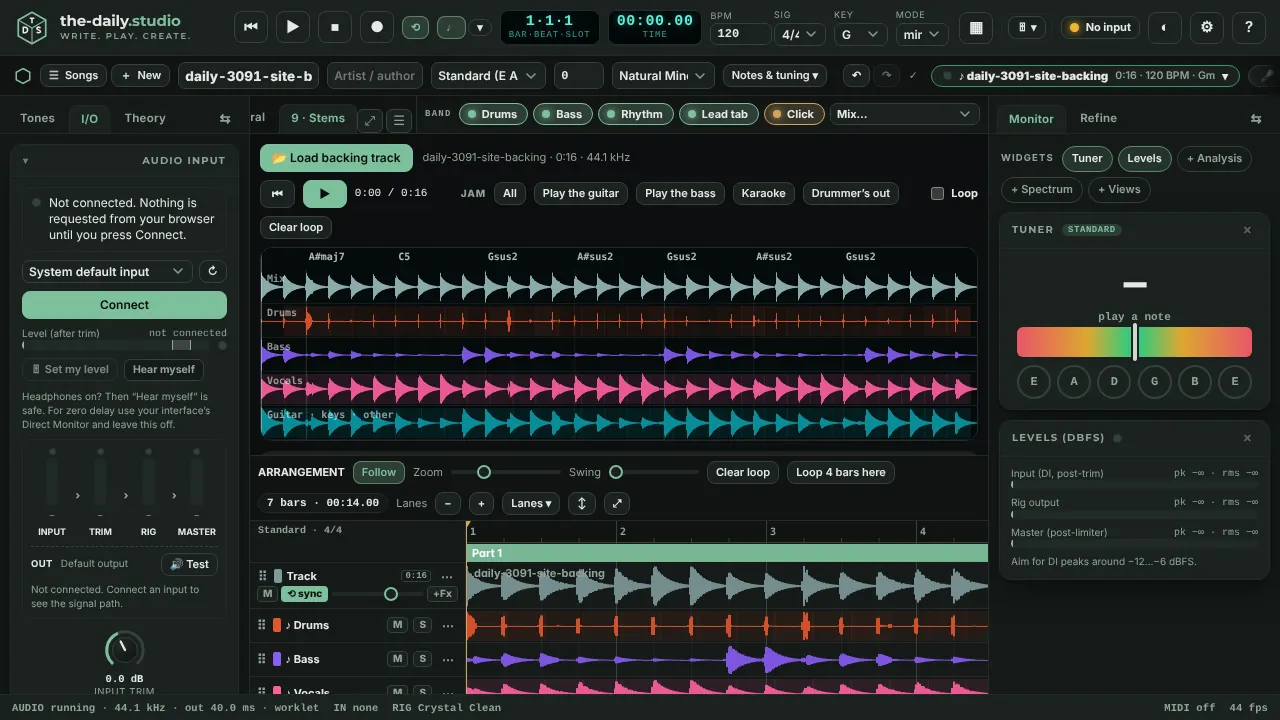
What you get
- Four stems: drums, bass, vocals, and guitar / keys / other. Each has mute, solo, a level and a WAV export, and a note of how present it is in the track.
- Practice presets in one click: Play the guitar, Play the bass, Karaoke and Drummer's out.
- The tempo, key and the chord of every bar, with a drum groove you can copy to the band.
- A loop: Shift-click the waveform to set where it starts and Alt-click to set where it ends.
- The track and its stems also appear as lanes in the arrangement, on the bar grid, so you can record along with them.
How to use it
- Open the Stems tab and press Load backing track. Any audio file your browser can decode works.
- Wait for the progress bar. The analysis runs in a worker on your computer.
- Pick a practice preset or mute and solo the stems yourself.
- Use Import chords as the song, or Track + band together, to carry the result into the rest of the studio.
How it separates, honestly
This is classical signal processing, not a trained neural network: harmonic and percussive separation, a bass harmonic comb and a centre-channel vocal mask. That keeps everything on your device and makes it fast, and it means the result is for practice, not for a release. Drums, bass and vocals come out best; the guitar / other stem is whatever is left, and the app cannot tell whether a guitar is in the track at all. On a synthetic benchmark the drums, bass and vocals are recovered well to moderately, and the remainder poorly.
If you need studio-grade stems, use a neural separator built for that. If you want a private, instant way to play along, this is for you.
Use music you have the right to use
The app ships with no songs. A file you load stays on your device and is not shared. Make sure you have the right to use any track you split, and do not publish stems of music you do not own.
Questions
- Is it as good as an AI stem splitter?
- No. AI separators use large trained models and give cleaner stems. This one uses lighter signal processing, so it is private, immediate and works offline, with rougher results, especially on the guitar / other part.
- Does it upload my song?
- No. The file is decoded and analysed in your browser and is never sent anywhere.
- Which files can I load?
- Any audio file your browser can decode, for example WAV, MP3 or M4A. A long file takes longer to analyse.
Keep reading
- Chords, tab and lyrics from a song or your playingDetect the tempo, key and chords of a song, turn audio into guitar tab for your tuning, put lyrics under the chords and export ChordPro, MIDI or a print sheet.
- Record guitar and voice in your browserRecord guitar and microphone at once in your browser: two-input interfaces, count-in, punch-in, dry and wet takes, editable clips, WAV export.
- Hum a melody and get a whole songHum or sing for 10 to 30 seconds and get a full song: your notes, key and tempo, chords and every section, played by a band.