Live visuals and a light show for your music
The Show view turns a song into a stage: moving lights, haze and an LED wall that follow the chords and the drums, and laser patterns drawn on screen. Design the look like a lighting technician, send it full screen to a projector or screen, and keep it comfortable to watch.
Open the studio, free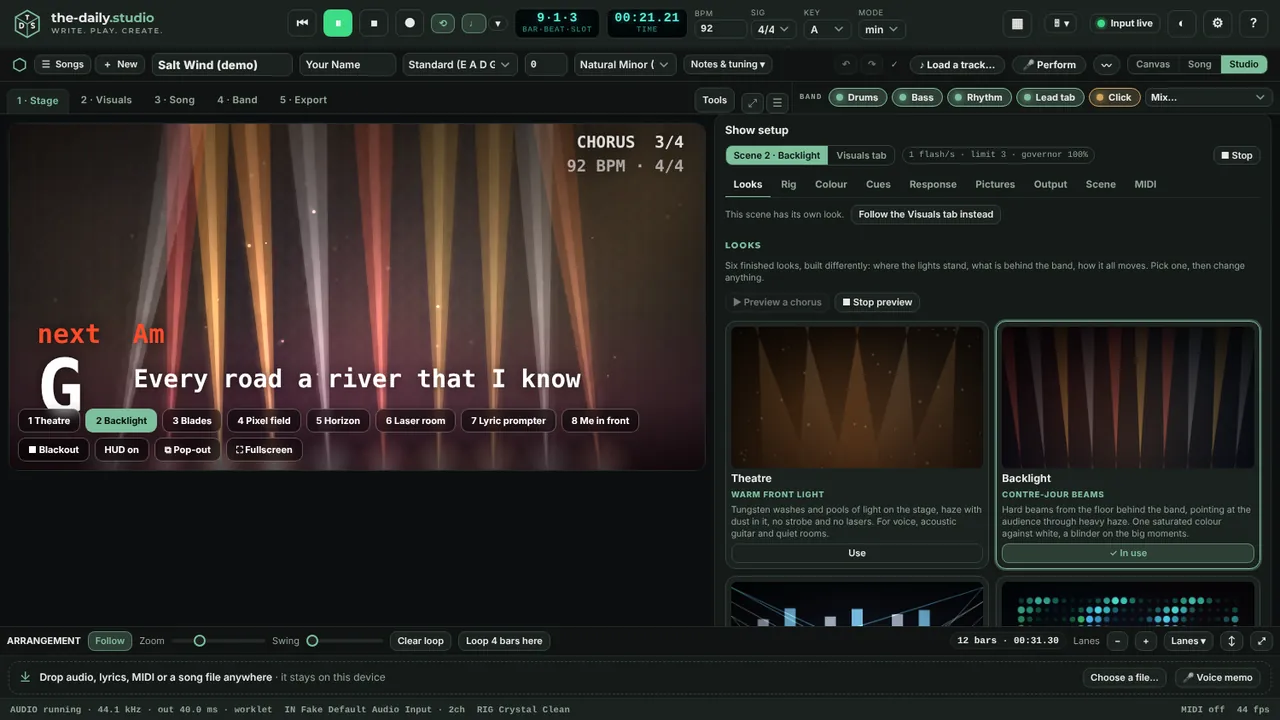
A stage that plays with the song
Everything on the stage moves with the song's position in bars, not a timer, so the same moment always looks the same and a four-bar sweep comes back to where it started every four bars. Drum hits, bass notes, chords and lead notes arrive from the band, so the light lands where the music does. With no song playing, your own notes move the show.
Set up the show
The show setup panel works like a lighting desk: choose a look, set the colours, the number and spread of the moving lights, the haze, the LED wall and the laser patterns, decide what each section does, and add your own pictures for a backdrop, the LED wall or a logo. Save looks and share them as a file.
Output for a room
Go full screen on a second display or projector, or open a clean output window with nothing on it but the picture. A master level, blackout and freeze keys, mirror and flip for rear or ceiling projection, safe-frame guides and test patterns (bars, grid, ramp, grey, white, black) help you line the picture up. Record the stage as a video with the song's sound.
Light comfort
Flashes are limited. Calm, Standard and Full set how much the lights may strobe and how hard they pulse, and a limiter watches the picture itself and eases off if it flashes too much. It is an engineering safeguard, not a medical guarantee. If you or your audience are sensitive to flashing light, choose Calm or turn the strobe off.
What the lasers are
The lasers are drawn on the screen. Nothing in the app drives laser hardware.
Questions
- Can it control real lights or lasers?
- No. It is a visual simulation on a screen or projector. It does not send DMX, ILDA or any other control signal.
- Are my pictures uploaded?
- No. Stage pictures are kept in this browser and are not part of song files.
- Can I use it for a live set?
- Yes, as a screen or projector visual. Check it on the actual display and computer beforehand: how smooth it is depends on your graphics hardware, and the app lowers its detail on its own if it runs slowly.
Keep reading
- Hum a melody and get a whole songHum or sing for 10 to 30 seconds and get a full song: your notes, key and tempo, chords and every section, played by a band.
- Record guitar and voice in your browserRecord guitar and microphone at once in your browser: two-input interfaces, count-in, punch-in, dry and wet takes, editable clips, WAV export.
- Chords, tab and lyrics from a song or your playingDetect the tempo, key and chords of a song, turn audio into guitar tab for your tuning, put lyrics under the chords and export ChordPro, MIDI or a print sheet.