Record guitar and voice in your browser
Plug in a guitar, sing into a microphone, or do both at once. Every take goes into a multitrack arrangement that you can move, trim, fade and mix, and it stays on your device.
Open the studio, free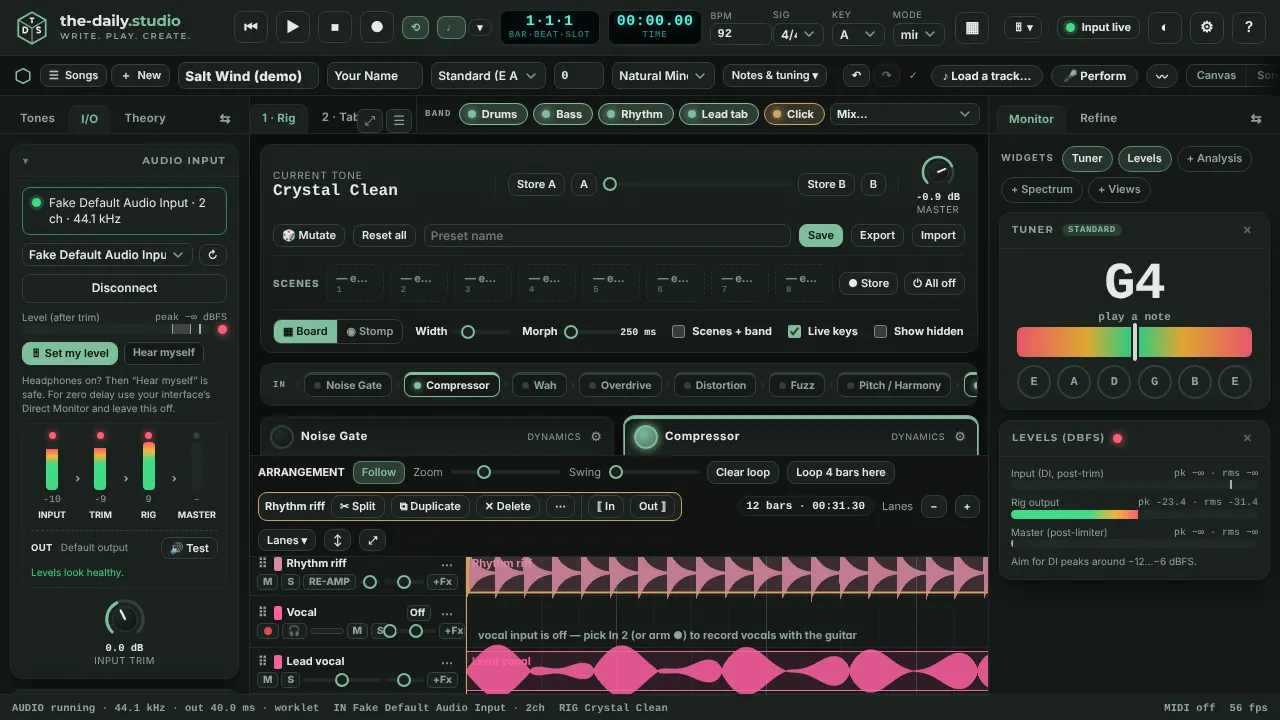
What you need
Any microphone will do. For a guitar and a voice together, use an audio interface with two inputs (a Focusrite Scarlett Solo, 2i2 or 4i4, for example). The browser sees such an interface as one device with two channels, and the-daily.studio reads input 1 and input 2 separately: one as the guitar, one as the vocal.
Nothing is switched on until you press connect. The browser then asks for the microphone, and that is how a web page reads an audio interface.
Record a take
- Choose your interface in the I/O panel and press Connect.
- Press Set my level, play or sing as loud as you will, and the input trim is set for you.
- Arm the guitar lane, the vocal lane or both, then press R. After the count-in, every armed lane records on the same clock, so the takes line up with each other and with the band.
- Press R again to stop. One press is one take, however long it is; the song grows to fit what you played.
Dry and wet, kept together
The guitar lane records the clean signal and the processed one, so you can re-amp the take through a different tone later or export either. The vocal lane records the microphone, with an optional high-pass and gentle compression.
Fix it without starting again
Each recording is a clip. Move it, trim it, fade it, split it, or duplicate it. Punch in over a single mistake, delete a range and close the gap, and set per-clip gain and crossfades. One undo history covers the song, the takes and the mix.
Mix and export
Each lane has volume, pan, mute, solo and send effects. Auto-balance sets starting levels from measured loudness. Export a master WAV that is rendered faster than real time with its loudness reported, each part as its own WAV, or all takes as dry and wet files.
Honest limits
Latency is set by your computer, your interface and your browser; the app measures a real round-trip with a loopback test rather than guessing. A device that exposes only one channel (a webcam microphone, for example) cannot be split into guitar and vocal. Effects are built in; there is no VST, AU or ASIO support.
Questions
- Can I record guitar and vocals at the same time?
- Yes, with a two-input audio interface: one input as Guitar, the other as Vocal, both lanes armed. With a single microphone you can record one source at a time and layer the takes.
- Are my recordings uploaded?
- No. Takes are stored in this browser on your device, in your song, and leave only when you export them.
- Can I hear myself while I record?
- Yes. Hear myself plays the rig live. If your interface has its own direct monitoring, leave the app monitor off to avoid hearing everything twice, and wear headphones so a microphone cannot feed back.
Keep reading
- Split a song into stems in your browserSeparate a song into drums, bass, vocals and guitar/other in your browser and mute the part you play.
- Chords, tab and lyrics from a song or your playingDetect the tempo, key and chords of a song, turn audio into guitar tab for your tuning, put lyrics under the chords and export ChordPro, MIDI or a print sheet.
- Hum a melody and get a whole songHum or sing for 10 to 30 seconds and get a full song: your notes, key and tempo, chords and every section, played by a band.